One intelligence layer, from drawing to verified NC.
DION AI runs on the shop PC. It reads design intent, reasons over an ontology, and proposes verified machining.
Deterministic, end to end.
Import
Native CAD & neutral formats, on-device.
Feature recognition
Geometry resolved into machinable features.
Ontology reasoning
Constraint-based strategy, not guesswork.
Strategy
Tools, operations, parameters proposed.
Verified NC
Human approval, post, send to machine.
Click any card to flip for detail.
Command Center
A single operations surface for every pipeline, agent and knowledge view — on the shop floor.
- Live pipeline status
- Unified navigation
- On-device, real-time
Blueprint Pipeline
Compose machining workflows visually as a node graph — inputs, reasoning and outputs wired together.
- Node-graph editor
- Reusable templates
- Deterministic wiring
Data Pipeline
A live topology of every database the intelligence layer runs on — nodes, wires and flow in one view.
- Multi-database topology
- Live node & wire view
- Relational · graph · cache
Knowledge Graph
Explore the ontology — how machines, tools, features and processes relate — as a live graph.
- Ontology explorer
- Entity relationships
- Traceable reasoning
CAD Control
Launch and drive supported design & machining applications directly from the board.
- Application orchestration
- Document-aware
- On-device bridge
ML Extraction
Vendor CAD·CAM files distilled into atomic attributes that feed the corpus and the databases.
- Atomic attribute extraction
- Corpus & DB ingestion
- Honest accept/reject ledger
Tool Library
A structured catalog of tooling, holders and cutting data the engine reasons over.
- Structured tooling
- Cutting data
- Reused across jobs
Agent Kanban
Coordinate autonomous agents and human approvals on one transparent board.
- Agent orchestration
- Human-in-the-loop
- Full audit trail
KBM Knowledge Base
The machining knowledge master — tools, materials and process rules parsed live from the CAM data folder.
- 5,061 tools · 1,207 rules
- Machine, post & holder masters
- Live parse of CAM data
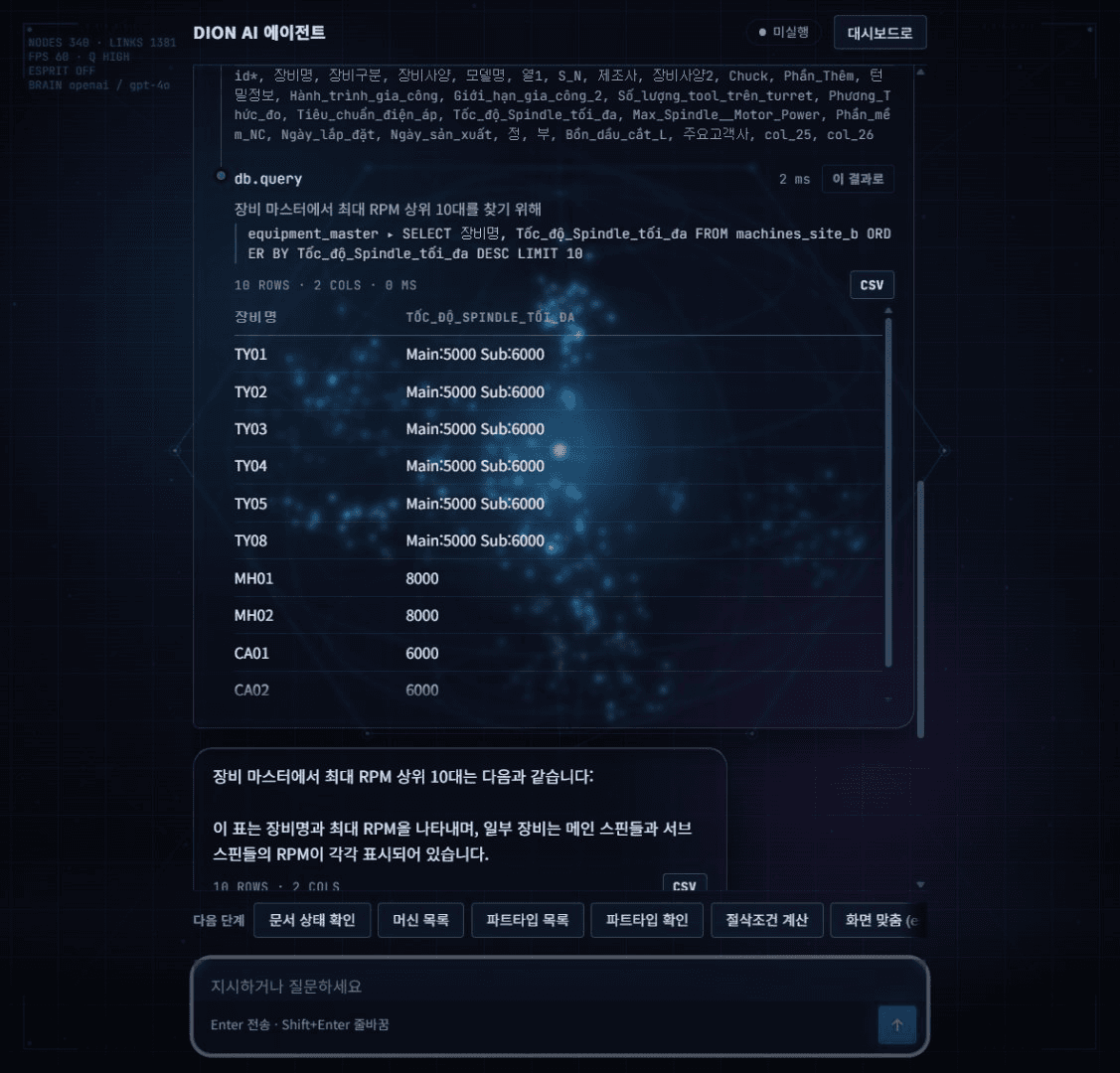
Direct it in plain language.
A live run in agent mode: one suggested query, sent as-is. The agent plans, inspects the schema, writes and runs the SQL itself, and returns the answer as a table — every step on screen.
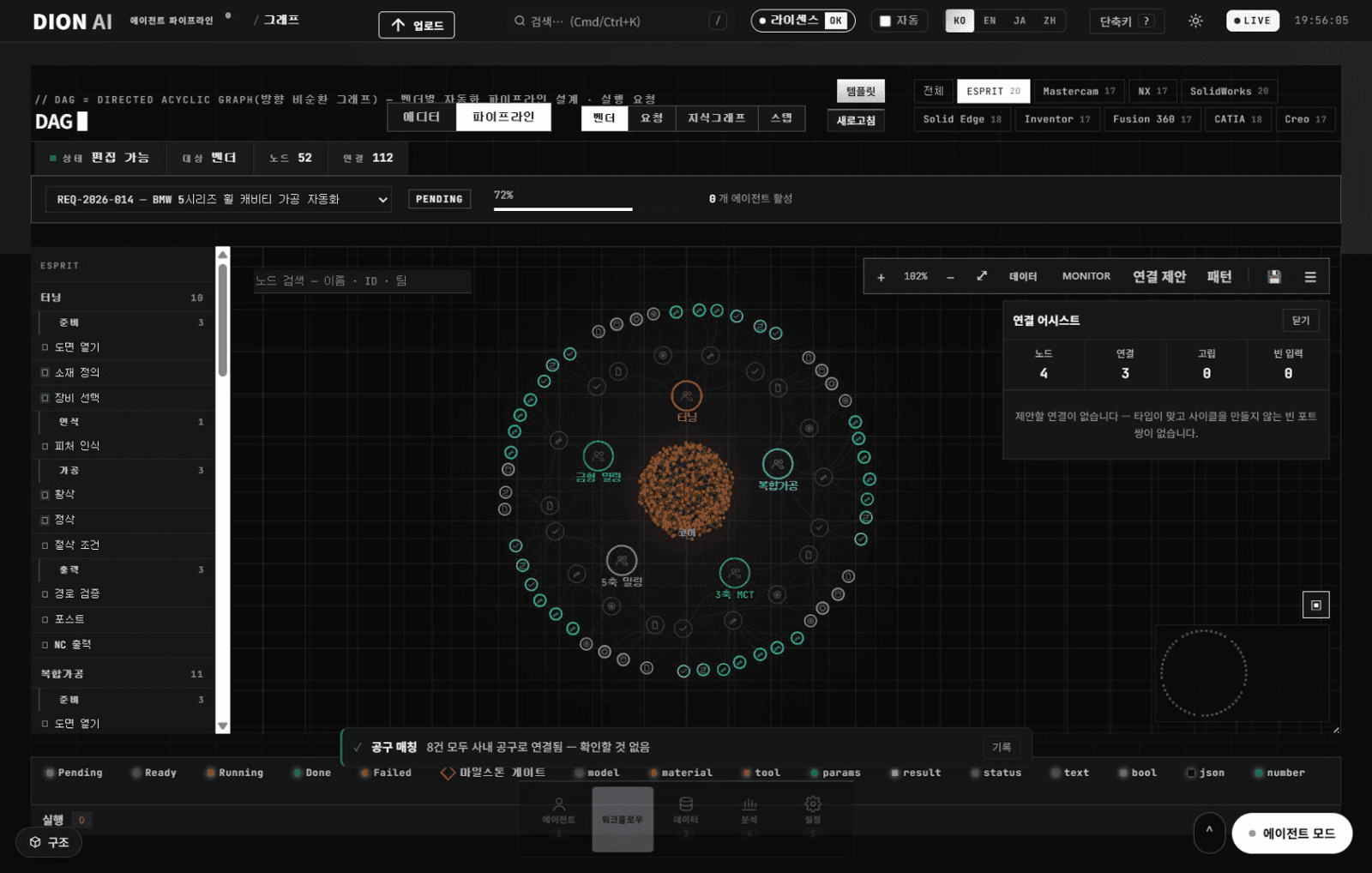
Every vendor, one process graph.
The process DAG workspace: vendor pipelines laid out as a step ring around the core, with the connection assistant checking typed, cycle-free wiring — 52 nodes and 112 links in this view.
Every board screen, at a glance.
24 board screens, grouped by function.
- #command-centerEngineer chatAsk about cutting conditions, tolerance, tools and NC
- #kanbanWork boardTickets and progress
- #approvalsApprovalsThe human verification step
- #assistAssistTurning and milling guided steps
- #knowledge-graphKnowledge graphQuery code, routes, tools and documents
- #skills-mcp-graphAI tool surfaceESPRIT ribbon, skills, MCP and API at a glance
- #graphGraph workspaceNode graph editing and process DAG monitoring
- #pattern-libraryPattern libraryVerified machining workflows
- #data-lakeData lakeMulti-database routing
- #kbm-sdfKBM SDF managerkbm.sdf inventory and rebranding
- #kbm-dataKBM data5,061 master rows and tool registration
- #extractVendor extractionAtomic CAD/CAM attribute extraction with history
- #attr-tableAttribute tableBrowse, filter and sort the extracted rows
- #db-pipelineDB pipelineNodes and wires with live BI
- #step-pipelineSTEP pipelineFrom 3D model to machining NC
- #tool-libraryTool librarySearch and catalogue
- #nominal-policyNominal policyTolerance pairs, candidate comparison, policy choice
- #cad-controlCAD/CAM controlPer-vendor install, version, start and stop
- #analyticsKPI metricsProductivity, quality and cost
- #supervisor-settingsLLM keys and modelsEnter API keys, scan and pick models
- #licenseLicenceActivation and renewal
- #vendor-settingsVendor displayChoose which vendors appear on the board
- #diagDiagnosticsEndpoint health at a glance
- #audit-logAudit logSystem event history
Integration scope on NX Open
DION AI works only through documented NX Open APIs. Geometry and CAM data stay in NX, and NC is produced by the customer's own post. Anything that changes the part or emits NC passes a human approval gate.
Document
- Open and save parts
- Active part info — bodies, features, material
Feature recognition
- Geometry resolved into machinable features
- Feature list and individual feature query
Geometry
- Create profiles, lines and arcs
CAM operations
- Hole making
- Pocket milling
- Contour milling
- List and delete operations
- Read and edit parameters — speed, feed, depth of cut
Post and NC
- Run the customer's own NX post
- NC output
Available scope depends on the customer's NX licence and configuration.
Siemens licences we hold
Licences obtained through the Siemens technology partner programme. They are the environment in which the NX and Teamcenter integration is developed and validated - not items a customer needs to purchase. Customers run DION AI on the NX licences they already own.